Clean Your Code!

You may have heard of Uncle Bob. If you have not, now is as good a time as any. Robert C. Martin, known as Uncle Bob, is the author of quite a few canon books.

The one I want to focus on in this post is Clean Code. Out of all of Uncle Bob’s books I’ve read, I would recommend this first. I felt it improved me as a developer like no other book.

I don’t always agree with Uncle Bob, technology-wise or otherwise. But the fact is, Uncle Bob has a very interesting view of the technology world. He helped me form my identity as a developer, over 30 years after I started developing. That says a lot.

The book focuses on code readability. It helps you look at your code from a reader’s perspective. I am confident that my code has never been easier to understand by other developers. In fact, going back to code I’ve written two weeks ago, I AM those other developers.

I won’t bore you with too many details. Spoilers and all. Just get the book and read it. I’d love to hear your thoughts when you’re done.

Be a better developer. Read this book.

The art of programming by Geek & Poke is licensed under CC BY 3.0. Trimmed to fit.
I may get commissions for purchases made through links in this post.
An Automated Green Thumb

I was trying to come up with ways to save money. One idea that came to mind was to grow my own food. Unfortunately, living in a flat, there is a limit to my options.

It seems I was not the only one thinking about this, and some clever people came up with a working solution. In my mind, a working product is one that works for you. It requires minimal effort, if any, and produces consistent, reliable results.

Early days

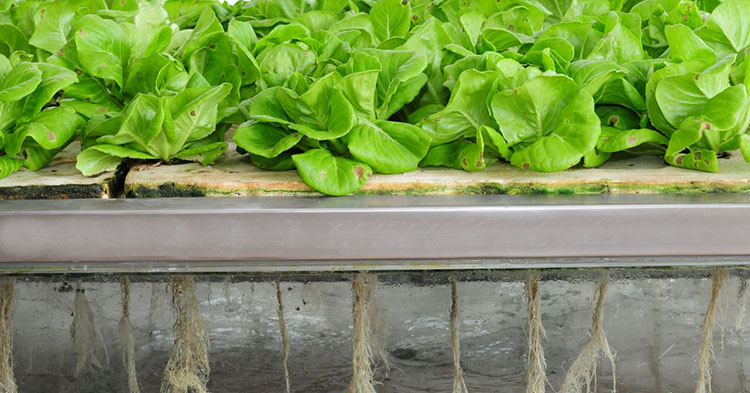
The AeroGarden line of hydroponics products is exactly that. You set it up in minutes. It then tells you precisely what to do and when. Your responsibility is to provide fresh water and food periodically. And keep it plugged in to a power source. That is it. It even takes care of lighting.

In return, you get herbs or vegetables all year round. My AeroGarden Harvest Classic currently grows Genovese Basil, Curly Parsley, Thyme, Thai Basil and Mint. The Thai Basil and Mint grew so wild I had to saw branches off to keep them from overgrowing. In fact, they grow so fast I have plenty left to share with friends.

Having fresh herbs every day is great. Not having to work hard to get them is even better.

A few weeks later

There are plenty of seed kits for the AeroGarden, in case you want to grow something else. Salad greens, salsa veggies, cherry tomatoes and Italian herbs are popular options.

A word of caution, though. Read the instructions. We accidentally trimmed our Basil too much early on, and it struggled to grow back. We had to take it out and plant another. Let your plants grow to a healthy size, and trim them sparingly.

I may get commissions for purchases made through links in this post.

I Disappear

It’s an interesting world we live in. A few huge companies surround us, offering us some amazing services. Some are free, others come at a fee. But all come with an added cost of giving up on some of our privacy.

I used to wave this concern off. What do I care, let them store data about me. Over time, I realised I really should care. There are a lot of articles out there that tell you why. And, for the most part, the effort involved is minimal.

One of the ways to protect your identity is to use a VPN. There are quite a few services out there that offer you an anonymous VPN. I can only testify to the one I’m using, which is IPVanish*. But maybe I should take a step back. What is a VPN?

Let’s say you live in the UK. Servers probing your IP address will know you are connecting to them from the UK. See here. Well, that’s a bit annoying. That means Facebook, Google and a host of other companies know where you are connecting from.

Along comes the VPN. A VPN, or a Virtual Private Network, is an extension of your local network. What this actually means is, the servers you connect to think you are whoever the VPN is. So let’s say your VPN service provider has a server in Spain which you connect to. Now, if you check where servers think you’re from, you’ll find they think you are connecting from Spain. Nice!

Tricking servers into thinking you’re coming from elsewhere has other advantages. For example, you can consume content that’s restricted to that particular country. Censorship 0, us 1. Go team!

Why did I choose IPVanish? First, they support a very broad range of platforms. From Windows, to MacOS, to Android, iOS, Linux, Chrome OS and then some. Second, they have servers pretty much everywhere in the world (well, over 75 locations in the world). They have no speed limit, no traffic logs, no device limit… So quite attractive.

Anther service you might want to consider is NordVPN. Now go and disappear!

Until November 30th, you can claim a 50% discount using my link.

I may get commissions for purchases made through links in this post.

Ode to Robbie

I’ve never been very good at dusting. My place has been quite tidy for as far back as I can remember. Dusting, though, is something I struggled to get myself to do.

The original Robbie

I still did not get the hype around cleaning robots. That is, until my family bought me one for my birthday.

After the first run, its container was full of dust. Well, that was kind of to be expected. I gave it a second run. Full of dust. After five consecutive runs I got the idea and gave it a break. Clearly there was much, much more dust in my flat than I was aware of.

I have since moved to a two storey flat. So of course I had to get another one for the second floor. My downstairs one is scheduled to clean at 8am. That means it usually finishes cleaning before I go downstairs. The one upstairs is scheduled to run at noon, right on time for my lunch break. Both run every other day. Our house is dusted all year round, and we don’t have to lift a finger!

Now, I won’t lie. It’s not all perfect. It does shut doors. On occasion, it moves furniture around. If I was bad and left a sock on the floor, it would choke on it. But all in all – what a massive improvement.

The robot my family chose for me was a Neato. What a clever choice! It really is one of the best out there. I now have two models, both of which we nicknamed Robbie. The first is the older Botvac DC02, which is still my favorite. It always gets the job done without a fuss, and its interface is very clear. The other is the Neato D7. While it looks neater, I find it fails me more often. For example, it often only vacuums half a room and then goes back to its base, reporting success. Not great.

I will leave you with a few final notes on why I’d recommend Neato specifically. First, it integrates with Google Home and Alexa. It also sends you notifications when it’s stuck or finished. It maps your house and shares that map with you. Thanks to its shape, it vacuums corners really well. Round robot cleaners struggle with corners.

Save yourself time. Get a cleaner house. Whether it’s a Neato or an iRobot Roomba, get a cleaning robot.

Edit (04/04/2024): Note that Neato was bought by Verwerk in 2017, who continued to kill Neato Robotics. I would sadly not recommend buying a Neato anymore, despite how great the product was.

I may get commissions for purchases made through links in this post.

A Book to Live By

Ok, I may have gotten a bit carried away with the title. But really, this book has changed my way of thinking about everyday problems.

Algorithms to Live By is an enlightening read. It helped me look at life through a prism of a problem solver. Suddenly everything we do can be looked at as a problem waiting to be solved. From sorting my collections, to choosing whether to eat at a new restaurant or an old favorite… It can all be mathematically analyzed – and this book helps you reach the answer.

Unlike many algorithm books, this isn’t a heavy read. Quite the opposite. With fun, relatable examples, it pulls you in and gets your brain buzzing. It won’t leave you hanging, either, because the answers are handed to you in a clear way. It almost makes you wish you had a problem you could apply all this new knowledge to.

Sadly, I lost my copy at an airport while traveling. I’m hoping it made for a nice read to somebody else. I’m definitely getting another copy, though. This is one I want on my shelf.

I may get commissions for purchases made through links in this post.

Decisions, decisions…

Quite often, I’m faced with difficult decisions. Choosing our next flat, our next investment, where to take our next vacation (once we can travel again). There are too many factors for me to take into account. I simply can’t reach an educated decision in my head.

Sure, I could do a pros/cons list. But really, that doesn’t work very well. Mostly because some factors are more important than others. So the number of factors in each column isn’t good enough an indicator of the best choice.

Luckily, there’s a solution. It’s called a decision matrix. The business world has been using it for many years to solve difficult dilemmas. You could create one using a simple Excel sheet. You could event jot one on paper. But, since you’re here, you know I have a simpler suggestion.


Allow me to introduce Choice Pro. It’s a free Android app that allows you to leverage the decision matrix in a friendly, accessible way. I developed Choice Pro because I saw the value of decision matrices. Yet, I was not pleased with the overhead involved in setting them up – making them a bit less accessible.

Of course, an app has other advantages: you can check your past decisions; you can make random decisions when all options are as good (or as bad!); finally, you can easily share the results with others.

Give it a spin!

Boil with class

One of my takeaways from Rich Dad Poor Dad was to invest in higher quality products. Note that I’m not saying “invest in expensive products”. Expensive does not always equate better. That’s why I do my homework.

In truth, I learned this lesson the hard way myself. I lost count of the number of cheap kettles I threw away. They short circuited, melted, broke apart… Eventually I switched to premium kettles. I think I only had to buy two in 10 years. I had to buy a second just because I moved countries.

Premium kettles offer more than just longevity. They tend to come with better warranties. They can boil water faster. They let you control the temperature, in case you’re making green tea. They offer a simmer option, so that if you forget you boiled water, the water isn’t cold by the time you remember. Other nice features to have include having a swivel base or greater capacity. To be fair, they also tend to look nicer on the counter.

The model I have is Sage‘s The Smart Kettle (BKE820UK) which I bought for £90.00 back in 2016. It got broken once, potentially by the cleaner drenching it in water. Sage offered fair compensation towards a new Kettle. It’s harder to come by now, but similar, newer models exist.

I may get commissions for purchases made through links in this post.
Work, Droid!

It often feels like our tech no longer works for us. It’s us who are working for it. Charging it up, responding to constant notifications… You get the point.

I’m trying my best to set things right. Technology is a tool and it’s there to make our lives easier.

One way of achieving that is automating tasks. I have tried many apps in the past trying to achieve this goal: IFTTT (now a paid service), Llama (no longer available on the Play Store) and a few others. The one I ended up keeping is Autoroid.

Autoroid is a free Android app that configures your phone based on certain triggers. I have set it up to silence my phone at night, wake it up early on a weekday and late on a weekend.

I don’t leave home much now because of the pandemic and a remote work arrangement. But when I did, and eventually will again, it has other cool features. For example, I had it silence the phone and dim the screen when I’m at the cinema (using my geolocation).

Whatever your routine is, I’m sure there are some menial tasks you do with your phone. See how many of those you can set up once and never worry about again. Then do something cool with all that extra free time.

Small and Mighty

A working computer the size of a credit card? For $35? Sign me up!

The Raspberry PI, if you haven’t heard of it yet, is an amazing machine. Despite its tiny size, it is packed with features. It can run its own Linux version, as well as a few other operating systems, including a limited version of Windows 10.

So what can you do with one? Very cool stuff. I’ve used mine as a media centre, a retro gaming station and most recently, as a magic mirror.

To focus on efficiency, the latter is by far the most valuable for my wife and myself. Our Magic Mirror tells us the time, the weather for the next few days, our upcoming events and even shows us the word of the day. Oh, and it’s a mirror.

I really could not recommend the PI enough. Get one now, figure out what to do with it later. Are you still here? Go!

The small print: you will also need a power supply and a memory card. You can grab each for as cheap as $8. Depending on your project, you may need other accessories, such as a case, a keyboard, a mouse, a wireless dongle and so on.

Take a Note

This one’s dedicated to my wife.

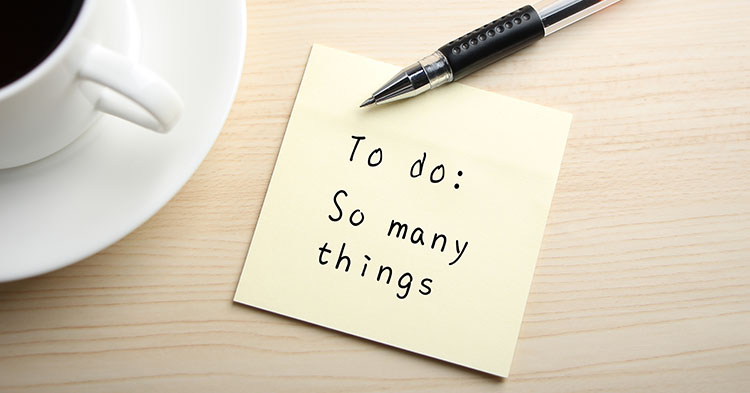
One thing I’m really terrible at is remembering things. I’m just too scattered. So I had to come up with a way to stop forgetting important things. From groceries we’re running out of, to project ideas, to movies I want to watch.

I found two tools that perfectly fit the bill. The first is Google Calendar. Synced across my devices, I always have access to my reminders saved in the calendar. It also helps me by bringing up the reminders when they make sense. If I’m doing my groceries shopping on a Friday, it makes sense to set the reminder to Friday. If I need to call my accountant, Monday morning might be a reasonable time. I even have a calendar shared with my wife that is presented on our magic mirror (more on that in a future post).

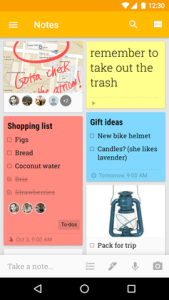
The second is Google Keep. Better for general lists, Google Keep is also synchronised across my devices. I can access it from my Windows machine, my Mac and my Android phone. I have a note for each project idea that comes to mind. I have a To Do note. I have a groceries note. I have a note with movies I’d like to watch. Conveniently, Keep lets you take plain, text only notes but also check list notes.

The reason this post is dedicated to my wife is, she took it up a notch for me. I used to lazily postpone adding items to my notes. Why do now what you can procrastinate, right? Wrong! I kept forgetting things despite having these great tools! But my wife won’t let me postpone adding items. She always urges me to note things down right away. And you know what? That really works. I hardly forget anything now. Happy days!